COMICRECAPDesktop appNew

Comic Recap – Automated AI comic review video maker

All it needs is a comic link: the app reads the story, writes the script, voices it, crops the scenes, adds motion and subtitles, then assembles the recap video. Run AI locally for free or use a cloud AI for better writing.

Comic Recap – Automated AI comic review video maker

About the software

Comic Recap Studio is installed on your own machine and handles the whole comic recap workflow that used to take hours of manual editing. Paste a chapter link and the app downloads every page, the AI reads each panel to understand who does what, writes a retelling in Vietnamese, turns it into narration, matches each sentence with the right panel, crops the image, adds motion and transitions, burns in subtitles and exports an MP4.

The AI runs one of two ways. Local AI runs on your machine through Ollama, completely free, and never sends your comics anywhere. For smoother scripts, switch on a cloud AI with your own API key (Gemini or any OpenAI-compatible gateway) — in practice it usually costs only about 1,000–3,000 VND per chapter depending on the provider.

Narration uses VieNeu-TTS running locally: free, unlimited, with 25 Vietnamese male and female voices covering Northern, Central and Southern accents. Subtitles are generated from the narration with adjustable font, colour, outline and shadow. A text watermark that drifts around the frame makes your channel recognisable and harder to re-upload.

Every AI result can be edited by hand: rename characters, rewrite a line, swap a panel, adjust a crop, and lock what you are happy with so later runs leave it alone. The interface is deliberately minimal — open it and start working, no video editing skills required. The app writes and narrates scripts in Vietnamese, and its interface is in Vietnamese.

Demo video

Comic Recap Studio demo: automated comic recaps from A to Z, just a comic link

Watch the demo video on YouTubeLength: 3:18

Paste a comic link, the app fetches every page and drops the junk

Open Import from web link and paste the chapter reading pages, one per line. The app opens each page in a hidden window, scrolls screen by screen so lazy-loaded images finish loading, keeps only the images inside the reader and drops logos, banners and ads. The chapter title is taken from the page too.

For a whole series, paste the series page: the app scans the chapter list so you can pick a range, or you can ask it to add the next N chapters from a single link. Besides web links it accepts image folders, ZIP, CBZ and PDF files.

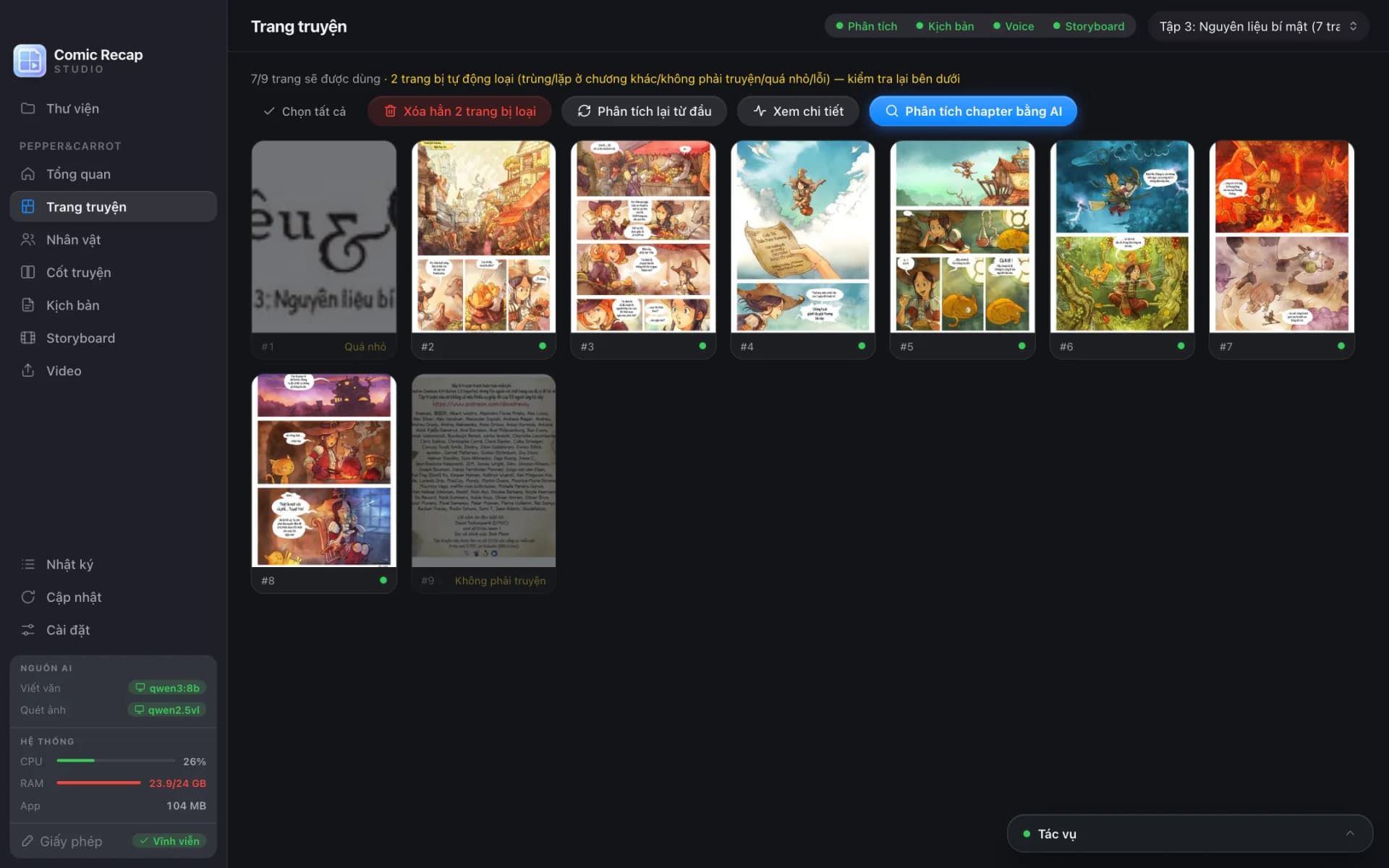
Before analysis, the app flags pages that are not part of the story: duplicates, scanlation banners repeated across chapters, tiny images, and credit, recruitment or promo pages at the start and end of a chapter. Flagged pages stay visible with a reason, and one click brings them back.

Vertical webtoon strips are cut into overlapping slices so the AI never misses a panel. The Pages screen lets you drag to reorder, rotate pages, and select many pages to exclude, restore or re-analyse at once.

The Pages screen in Comic Recap Studio: pages downloaded from a web link, with the title page automatically flagged as too small
Three chapters imported from web links in one go. Pages that are not story pages are flagged with a reason and can be restored with one click. Screenshots show the Vietnamese interface.

The AI reads the comic like a person: panels, characters and plot

A vision model reads every page, splits it into panels in reading order, describes each scene, recognises characters, actions, emotions and settings, and transcribes the speech bubbles. Each panel is scored for importance and visual quality so the video uses the right shots.

Characters are merged into one list for the whole series: name, aliases, appearance, role, relationships and even the natural Vietnamese pronoun to use in narration. In a new chapter the app recognises returning characters instead of treating them as strangers.

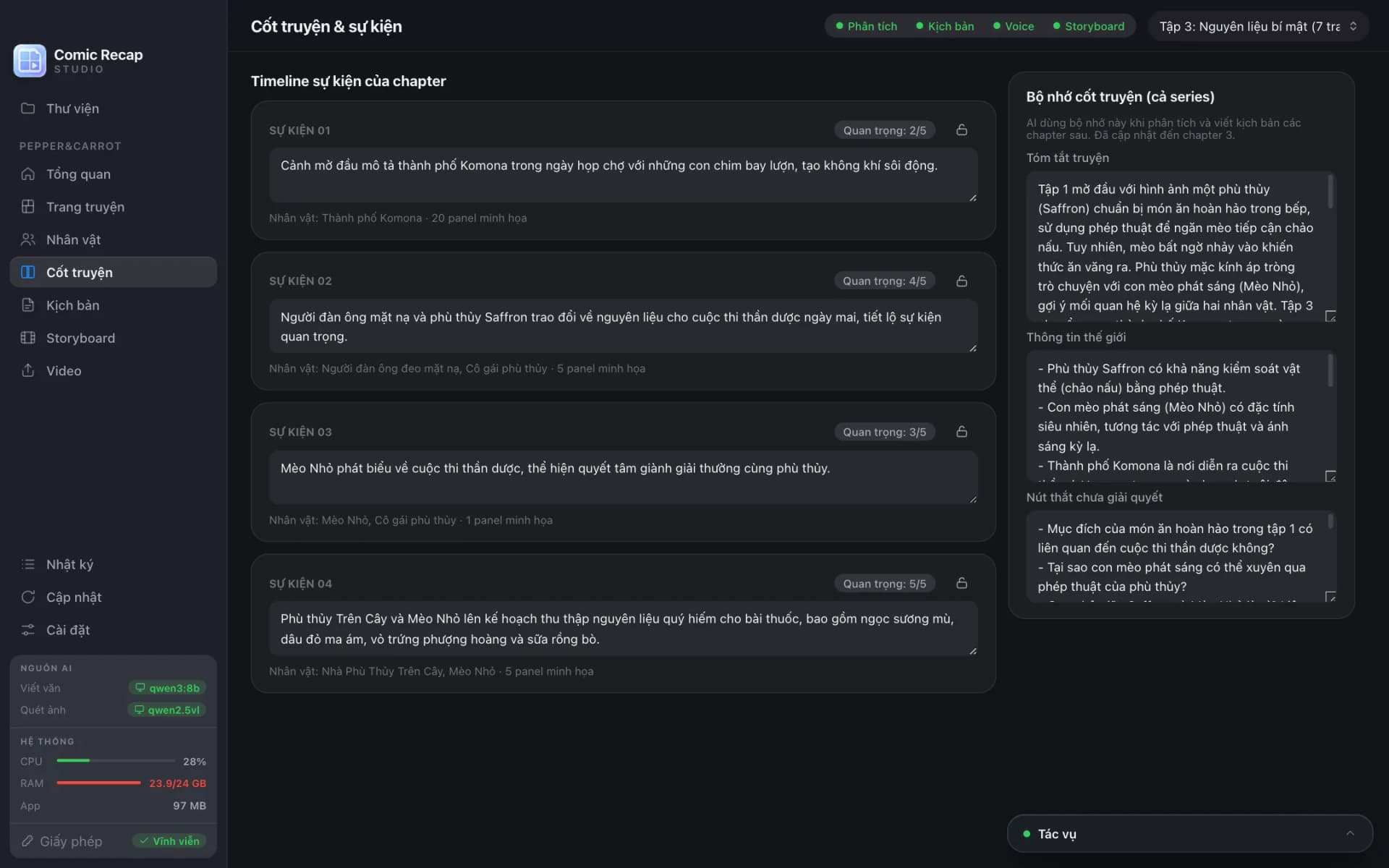
Each chapter's plot becomes an event timeline, plus a story memory with the synopsis, world facts and open threads so the next chapter continues the thread. Anything the AI is unsure about is marked low confidence for you to check.

Analysis results are cached per page: close the app midway and press Resume next time; add a chapter and only the new part is analysed. Characters and events can all be edited, merged and locked by hand.

The Story screen in Comic Recap Studio: the chapter event timeline and the story memory with synopsis, world facts and open threads
Each event has an importance score, the characters involved and its illustrating panels; the story memory on the right keeps the next chapter on track.

A natural Vietnamese recap script, checked against the artwork

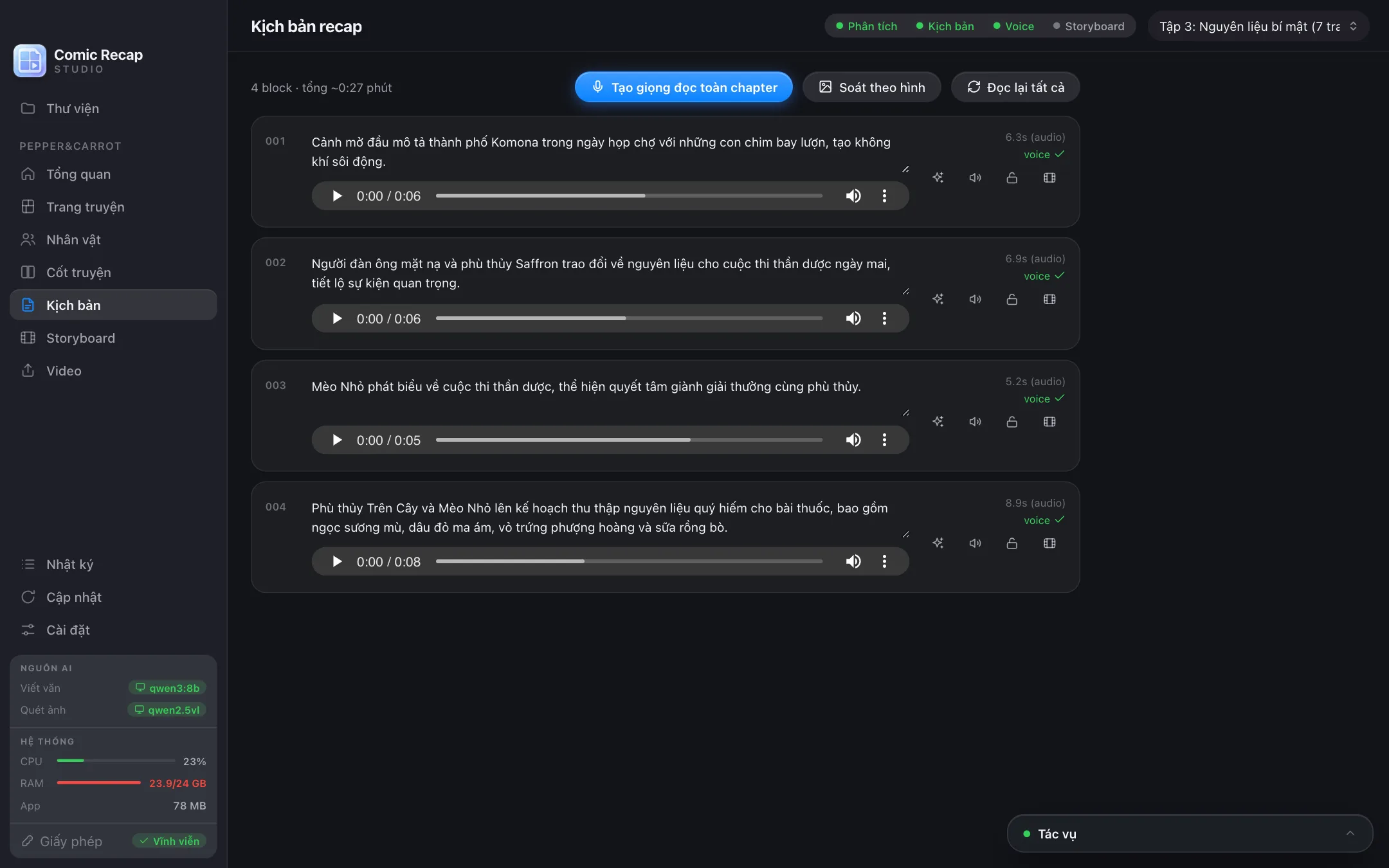
The script is ready as soon as analysis finishes, no extra button: each event becomes a Vietnamese narration paragraph with sentences sized for easy listening, retold in new words rather than copied dialogue. The app estimates the duration of every paragraph and of the whole chapter.

The Check against images button has the vision model compare every paragraph with its own panels and rewrite any that contradict the artwork — sharply reducing made-up plot details.

Every paragraph can be edited directly, or rewritten by the AI following your instruction and the project's storytelling style: neutral, fast-paced YouTube, cinematic, light comedy, serious, literary, or your own channel guidelines.

Lock the paragraphs you like so later runs leave them alone; after editing a paragraph, re-record just that one instead of the whole chapter.

The recap script screen in Comic Recap Studio: Vietnamese narration paragraphs with durations, voice generation and image check buttons
Each paragraph has an estimated duration and buttons to rewrite, preview and lock. Generate narration for the whole chapter in one click.

Free local AI or cloud AI: choose what fits your budget

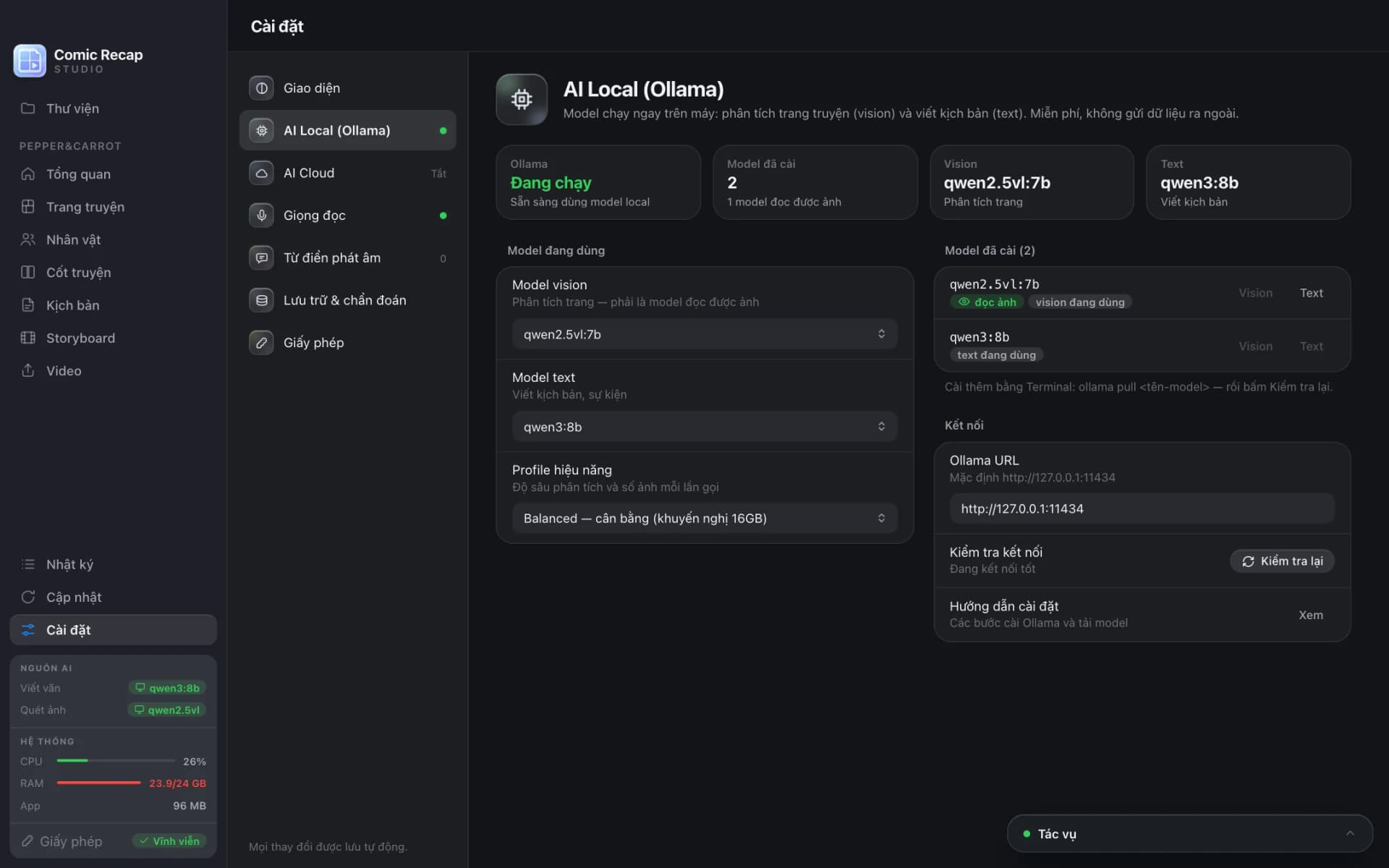
Local AI runs through Ollama on your machine: the qwen2.5vl vision model and the qwen3 writing model, with a lighter set for 8 GB machines. The app detects Ollama, guides the installation and downloads models with a progress bar, and offers four performance profiles from Fast to Quality. No fees, and your comics never leave your machine.

Cloud AI is for smoother, smarter scripts: choose Gemini or any OpenAI-compatible gateway and paste your API key. The key is encrypted with the macOS Keychain or Windows DPAPI. It usually costs only about 1,000–3,000 VND per chapter depending on the provider.

You can use the cloud only for writing and keep image reading local, or let the cloud do both. If the cloud has a network error the app falls back to local AI, and cloud tasks run in parallel for much faster processing.

The sidebar always shows which model is writing, which is reading images, whether each runs locally or in the cloud, and the tokens and estimated cost used so far — no surprise charges.

Local AI (Ollama) settings in Comic Recap Studio: Ollama status, vision model, text model and performance profile
Local AI runs on your machine for free. For better writing, switch on a cloud AI with your own API key.

An automatic storyboard: cropping, motion and transitions

The app pairs each narration sentence with the best panel: the right event, the right characters, important and good-looking panels first, no repeats, and no text-only panels. Each shot's length follows the real narration audio.

Images are cropped smartly around each panel's focus area. If a crop is off, open the crop editor to drag it, press Auto to let the app redo it, or re-crop the whole chapter at once.

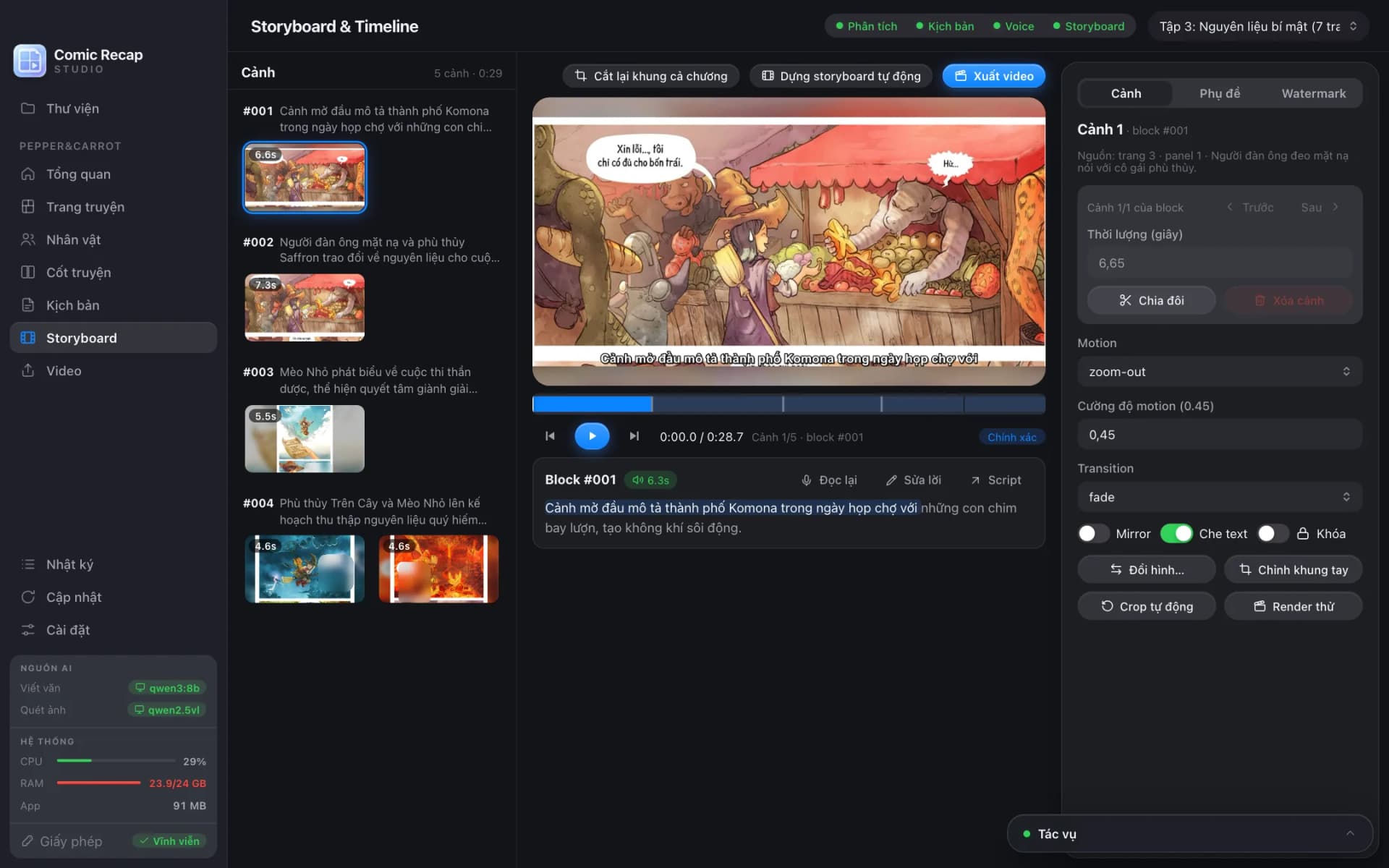
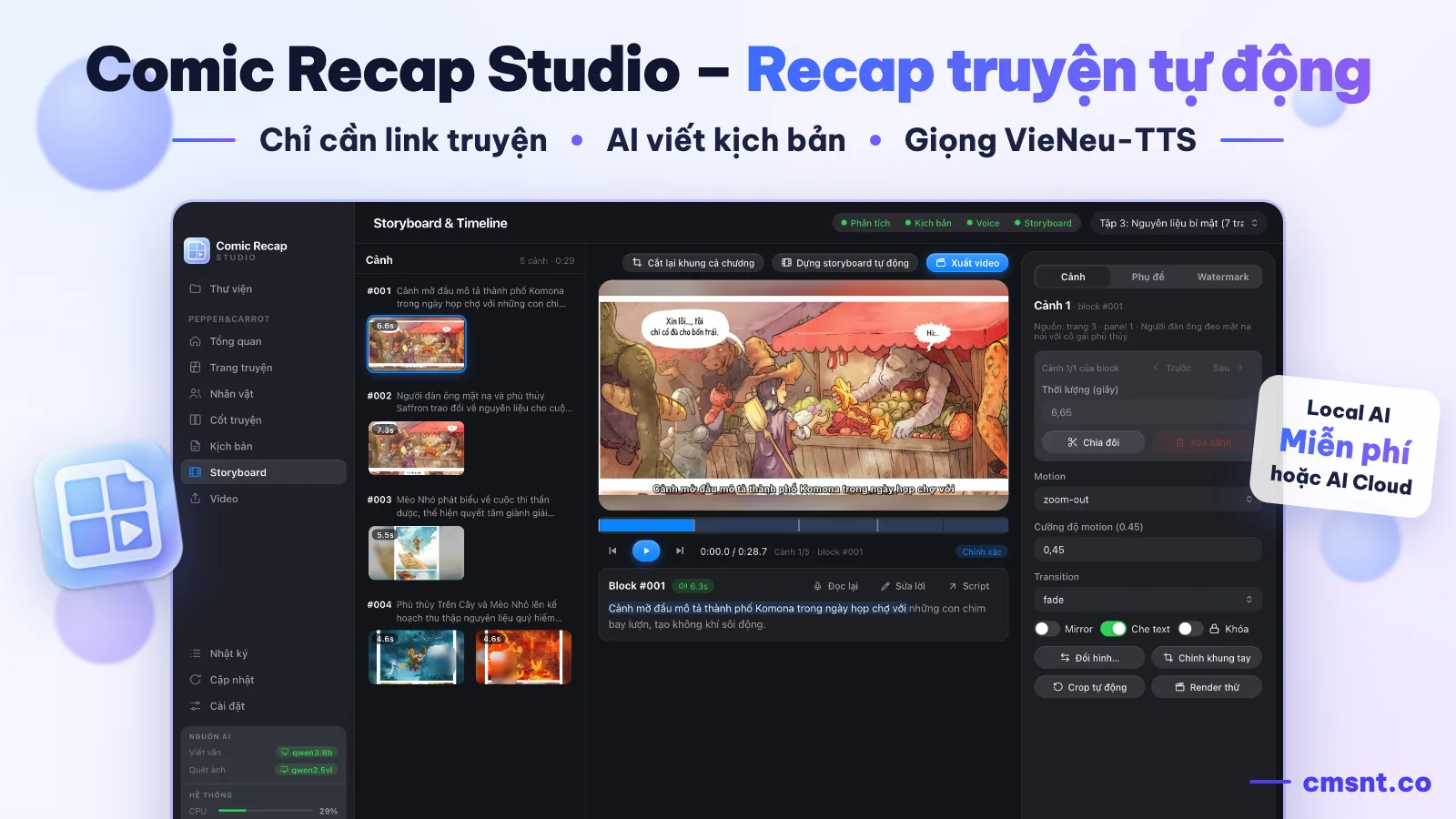
Each shot uses one of seven Ken Burns motions — static, zoom in, zoom out, pan left, right, up, down — with adjustable strength, and one of four transitions: cut, dissolve, fade and slide. Tall images scroll slowly over a blurred background instead of being squashed.

Text masking blurs speech bubbles or all text on the artwork so the video is your retelling, not a copy of the comic. Any shot can be split, deleted, reordered, mirrored, locked or test-rendered on its own.

The Storyboard screen in Comic Recap Studio: shots pairing narration with panels, a preview, motion and transition controls
Every narration sentence is paired with a pre-cropped panel. Change the motion, transition or crop right on each shot.

Free VieNeu-TTS narration and automatic subtitles

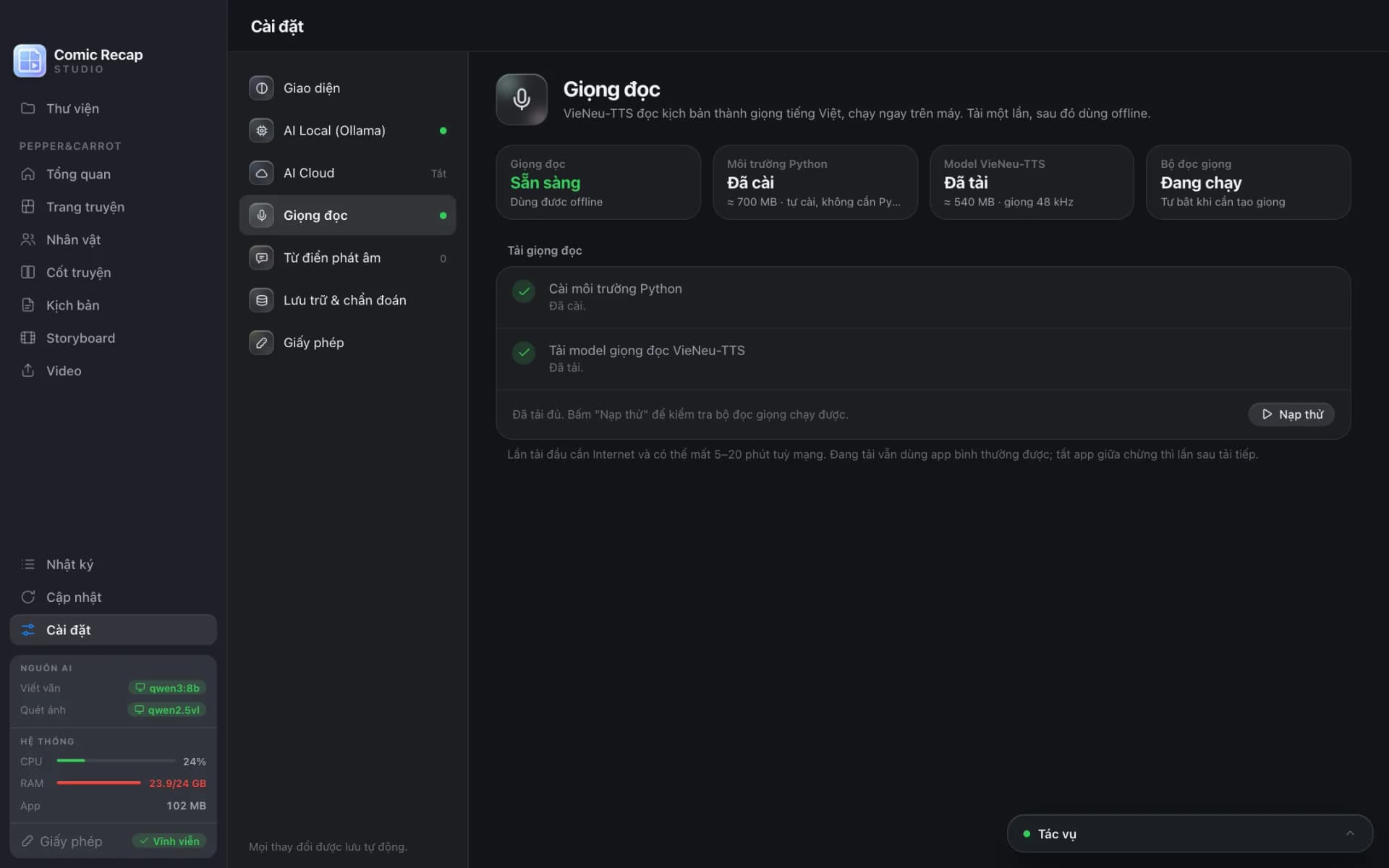
VieNeu-TTS runs on your machine: download the model once (about 540 MB) and narrate offline, with no per-character fees and no limits. There are 25 Vietnamese male and female voices with Northern, Central and Southern accents in several styles: natural, storytelling, news and audiobook.

Reading speed goes from 0.6× to 1.6×. Audio is trimmed of silence and loudness-normalised so every shot sounds even. A per-series pronunciation dictionary makes sure character names, techniques and unusual terms are read correctly.

Subtitles follow the narration exactly and switch on with one tap. Choose any installed font, size, text colour, outline colour and thickness, shadow, side margins and bottom margin to match your channel.

Voice settings in Comic Recap Studio: Python environment and VieNeu-TTS model installed, narration ready to use offline
Download the voices once inside the app and narrate offline for free. Each step's status is shown clearly — no Terminal needed.

An anti-re-upload watermark and exports in every format

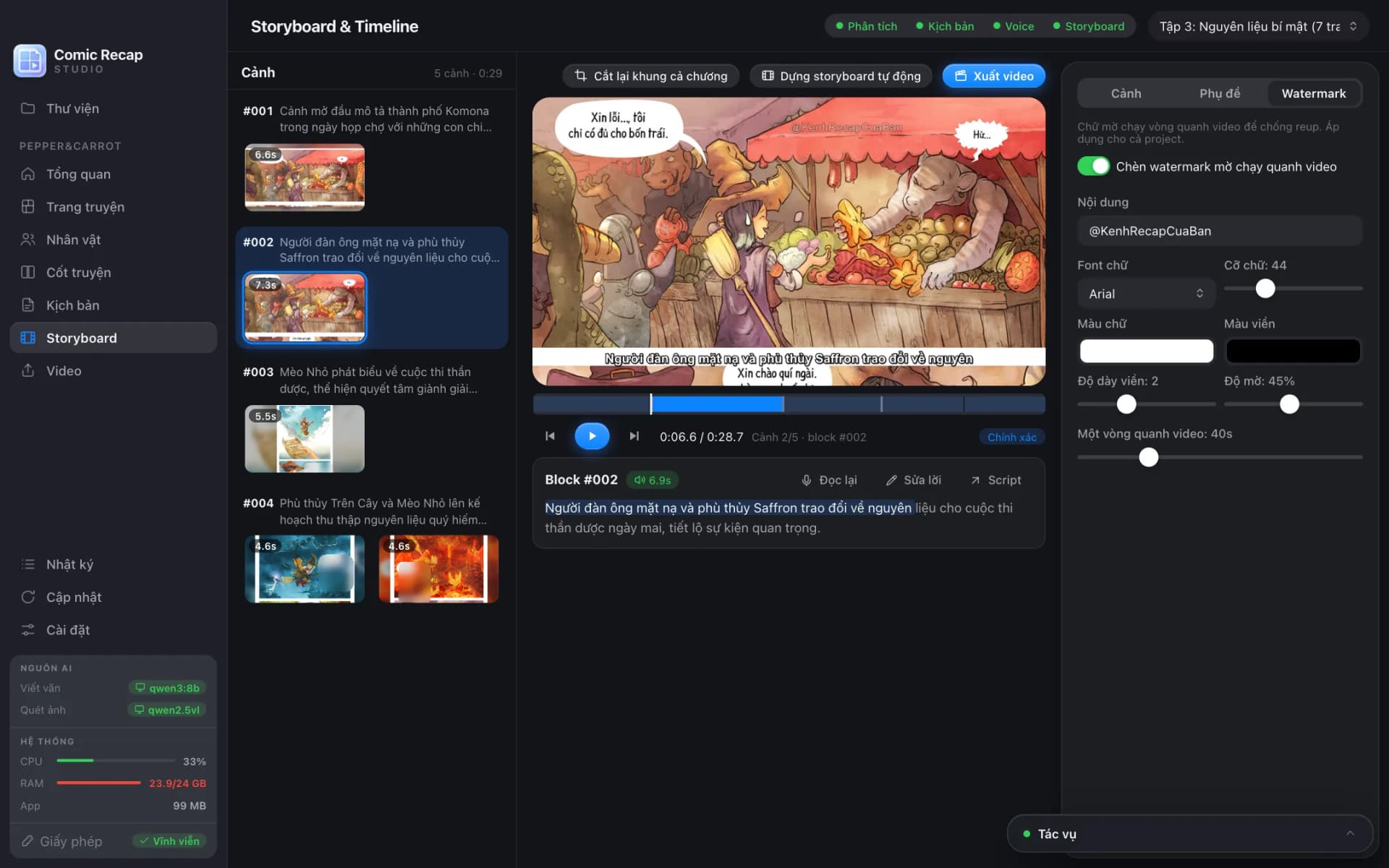
The text watermark drifts slowly around the frame through eight anchor points, so it cannot be removed by cropping a corner. Customise the text, font, size, colour, outline, opacity and lap speed — building channel recognition and discouraging re-uploads.

Export H.264 MP4 using presets: YouTube 1080p, YouTube 1440p, Shorts/TikTok 9:16, square 1:1 and a 480p draft for quick checks. The 16:9, 9:16 or 1:1 frame is chosen when you set up the project.

Before rendering, the app runs a quality check: shots missing audio or images, shots too short or too long, repeated panels and overly long sentences, plus an AI continuity pass. After export, the Videos screen lets you review each chapter and join several chapters into one FULL video without re-rendering.

The Watermark tab in the Comic Recap Studio storyboard: a text watermark drifting around the frame with adjustable text, font, colour, opacity and speed
Switch on the watermark and adjust its text, font, opacity and speed next to the preview — the preview and the exported video use the same maths.

What your machine needs in order to run it

  • macOS on Apple Silicon, or Windows 10/11 64-bit.
  • 16 GB RAM to run local AI comfortably; 8 GB machines can use the lighter models or switch to cloud AI.
  • Ollama if you use local AI (the app guides the installation and model downloads inside).
  • About 15 GB of free disk space for AI models, voices and exported videos.
  • An internet connection to import comics from links and for the first model download; after that narration and local AI work offline.

Key features

  • Import comics from web links: auto-scrolls, grabs every image, drops logos/banners/ads and names chapters
  • Paste a series page to scan its chapter list, or add the next N chapters from one link
  • Also import image folders, ZIP, CBZ and PDF
  • Automatically flags duplicates, repeated scanlation banners, credit, recruitment and promo pages; one click restores them
  • Cuts vertical webtoon strips into overlapping slices so no panel is missed
  • AI vision splits panels, describes scenes, recognises characters and emotions, and reads dialogue (OCR)
  • Series-wide character memory: name, aliases, appearance, role and Vietnamese pronoun
  • Event timeline and story memory so the next chapter continues the thread
  • Vietnamese recap script ready right after analysis, checked against the artwork to reduce made-up details
  • Edit by hand, have the AI rewrite in a chosen style, or lock each paragraph; every AI result is editable
  • Free local AI via Ollama, or cloud AI (Gemini, OpenAI-compatible gateways) at about 1,000–3,000 VND per chapter
  • Shows the models in use, tokens and estimated cost; falls back to local AI when the cloud fails
  • Free local VieNeu-TTS narration: 25 Vietnamese male and female voices across three regional accents
  • Reading speed 0.6–1.6×, plus a per-series pronunciation dictionary
  • Automatically pairs narration with matching panels, with shot length following the real audio
  • Smart focus-aware cropping, a manual crop editor and one-click re-crop for a whole chapter
  • Seven Ken Burns motions and four transitions
  • Blur speech bubbles or all text on the artwork
  • Automatic subtitles with adjustable font, size, colour, outline, shadow and margins
  • Anti-re-upload text watermark drifting around the frame, with adjustable opacity and speed
  • MP4 export: YouTube 1080p/1440p, Shorts/TikTok 9:16, square 1:1 and draft
  • Pre-render quality check and joining several chapters into one FULL video
  • Task queue with progress, detailed logs, stop and resume after reopening the app
  • Light and dark themes, in-app updates with checksum verification

Technology used

Electron + React + TypeScript, SQLite, Ollama (Local AI), VieNeu-TTS, sharp và ffmpeg

Interface screenshots

1 / 13

Please note

  • Original price 2,000,000 VND, now discounted to 1,500,000 VND.
  • Lifetime licence: buy once, use forever, with free updates for as long as the product is sold.
  • Each licence activates on one machine. To switch machines, deactivate on the old one and activate on the new one, right inside the app.
  • Local AI and VieNeu-TTS narration are completely free. Cloud AI fees (if used) are paid directly to the provider with your own API key.
  • Script quality depends on the AI model: local AI suits powerful machines and a zero budget, cloud AI produces smoother writing.
  • The app only downloads comics you are allowed to access and does not bypass logins, paywalls or DRM. You are responsible for content copyright and for the policies of the platforms you publish on.
  • Because of the nature of digital products - the licence key is delivered and usable immediately after payment - we do NOT issue refunds once a licence has been granted, except where a technical fault in the product cannot be resolved by us within a reasonable time.
  • Service policy: read it here.

Related products

Start your project

Ready to automate your online business?

Talk to CMSNT for a product recommendation, an in-depth demo and free initial setup.

Needs-based adviceFree live demoResponsive support